Canvas and Paint Brushes Mockup
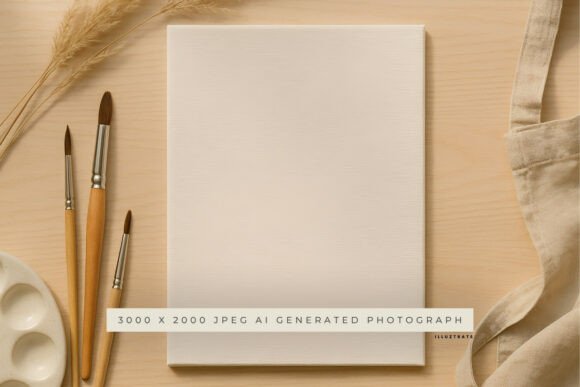
Designers, artists, and creators often need a way to present their work in a realistic, visually appealing format. That’s where the Canvas and Paint Brushes Mockup comes in. This high-quality AI-generated mockup offers a professional setting for showcasing artwork, logos, quotes, and branding projects. Supplied as a 3000 x 2000 px JPEG at 300 DPI, it’s compatible with Photoshop, Canva, and other editing tools. Simply overlay your design onto the blank canvas area to create polished, lifelike product previews.
Why This Mockup Matters for Different Users
The Canvas and Paint Brushes Mockup serves a variety of needs depending on who’s using it. Whether you're just starting out or have years of experience, the value you get from this mockup may vary based on your goals and workflow.
Beginners Looking to Learn
For those new to design, mockups offer a simple way to visualize how a finished project might look in a real-world context. The Canvas and Paint Brushes Mockup gives beginners a professional template to experiment with, helping them understand composition, layout, and presentation techniques without needing advanced skills.
Experienced Designers Needing Efficiency
Seasoned designers often prioritize speed and quality. This mockup streamlines the process of creating product visuals, especially for client presentations or portfolio work. With a high-resolution format and compatibility across platforms, it fits into existing workflows without requiring extra setup or learning time.
Artists and Hobbyists Showcasing Their Work
If you're an artist or creative hobbyist, presenting your work professionally can make a difference—especially when selling online or applying for exhibitions. This mockup provides a clean, artistic backdrop that highlights your original designs while giving them a tangible, finished feel.
How Different Audiences Use the Mockup
Depending on your role or project type, you might approach the Canvas and Paint Brushes Mockup differently. Here are a few examples of how various users might apply it:
- Entrepreneurs: Use it to present custom logo designs or branded artwork to potential clients or investors.
- Bloggers: Showcase quote graphics or visual content for blog posts or social media marketing.
- Educators: Demonstrate design principles or portfolio examples for students learning digital art or graphic design.
- Freelancers: Quickly create mockups for client proposals without spending time building scenes from scratch.
- Small Business Owners: Visualize product packaging, wall art, or custom prints before production.
Key Considerations When Choosing a Mockup
Not all mockups are created equal. When evaluating the Canvas and Paint Brushes Mockup, consider what matters most for your specific use case:
Quality and Resolution
This mockup offers a 300 DPI resolution at 3000 x 2000 pixels, ensuring that the final output is print-ready and suitable for both digital and physical use. High resolution is especially important for professionals who need sharp visuals for presentations or printed materials.
Compatibility and Ease of Use
Whether you're using Photoshop, Canva, or another design tool, this mockup is designed to integrate smoothly. You don’t need advanced technical knowledge—just drag and drop your design into the designated area to generate a polished preview.
Flexibility Across Projects
Because the canvas area is blank, this mockup is versatile enough to be used for different types of artwork. It works well for logos, illustrations, quotes, and even digital paintings, making it a reusable asset for creators who work across multiple design styles.
Professional Presentation
One of the main advantages of using a mockup like this is the ability to show your work in a realistic context. This can help clients or audiences better understand how the design will look in a physical space, increasing trust and engagement.
Real-World Examples of Use
Here are a few practical ways different users might apply the Canvas and Paint Brushes Mockup in their daily work:
- Marketing a New Brand: A startup founder wants to show potential customers how their logo will look on framed prints or wall art. Using the mockup, they overlay the logo design and generate visuals for their website or social media.
- Teaching a Design Class: An art teacher wants to show students how to present their work professionally. They use the mockup to demonstrate how to layer artwork and create a realistic preview of a finished canvas print.
- Selling Digital Art: An independent artist offers digital downloads and wants to show how the artwork will appear when printed. They use the mockup to create sample images for their online store.
- Building a Portfolio: A freelance designer needs to show past work in a professional format. They use the mockup to create consistent, high-quality images that enhance their portfolio presentation.
Is the Canvas and Paint Brushes Mockup Right for You?
Deciding whether this mockup fits your needs depends on your goals, experience level, and the type of project you're working on. Consider the following questions:
- Do you need a high-quality, realistic way to present your artwork or designs?
- Are you looking for something that works with tools you already use, like Photoshop or Canva?
- Do you value time-saving solutions that don’t require complex setup?
- Is professional presentation important for your audience or clients?
If you answered “yes” to any of these, the Canvas and Paint Brushes Mockup could be a valuable addition to your toolkit. It’s especially useful if you want to create polished visuals without the need for advanced photo editing or scene creation skills.
Final Thoughts
The Canvas and Paint Brushes Mockup bridges the gap between digital design and real-world presentation. Whether you're a beginner learning how to showcase your work or a professional preparing visuals for a client, this mockup offers a flexible, high-quality solution. By understanding your own priorities—be it ease of use, presentation quality, or creative flexibility—you can determine whether this tool aligns with your design or business goals.